Developer Guide
- Setting up, getting started
- Design
- Implementation
- Documentation, logging, testing, configuration, dev-ops
- Appendix: Requirements
- Appendix: Instructions for manual testing
- Effort
Setting up, getting started
Refer to the guide Setting up and getting started.
Design
 Tip: The
 .puml files used to create diagrams in this document can be found in the diagrams folder. Refer to the PlantUML Tutorial at se-edu/guides to learn how to create and edit diagrams.
Architecture
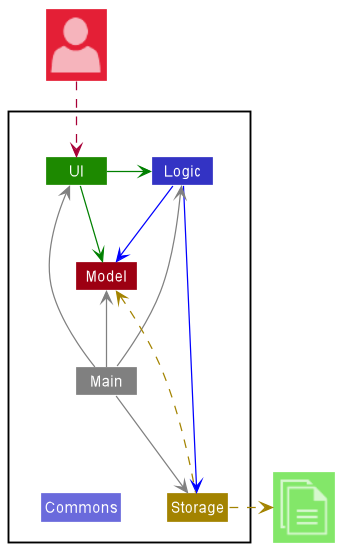
The Architecture Diagram given above explains the high-level design of the App.
Given below is a quick overview of main components and how they interact with each other.
Main components of the architecture
Main has two classes called Main and MainApp. It is responsible for,
- At app launch: Initializes the components in the correct sequence, and connects them up with each other.
- At shut down: Shuts down the components and invokes cleanup methods where necessary.
Commons represents a collection of classes used by multiple other components.
The rest of the App consists of four components.
-
UI: The UI of the App. -
Logic: The command executor. -
Model: Holds the data of the App in memory. -
Storage: Reads data from, and writes data to, the hard disk.
How the architecture components interact with each other
The Sequence Diagram below shows how the components interact with each other for the scenario where the user issues the command delete 1.
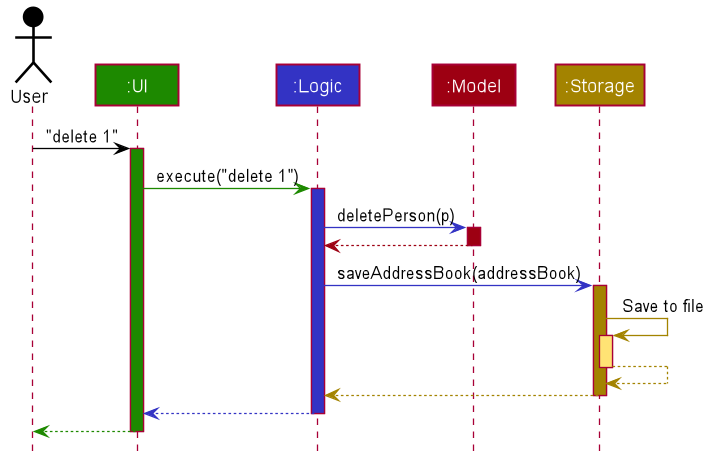
Each of the four main components (also shown in the diagram above),
- defines its API in an
interfacewith the same name as the Component. - implements its functionality using a concrete
{Component Name}Managerclass (which follows the corresponding APIinterfacementioned in the previous point.
For example, the Logic component defines its API in the Logic.java interface and implements its functionality using the LogicManager.java class which follows the Logic interface. Other components interact with a given component through its interface rather than the concrete class (reason: to prevent outside component’s being coupled to the implementation of a component), as illustrated in the (partial) class diagram below.
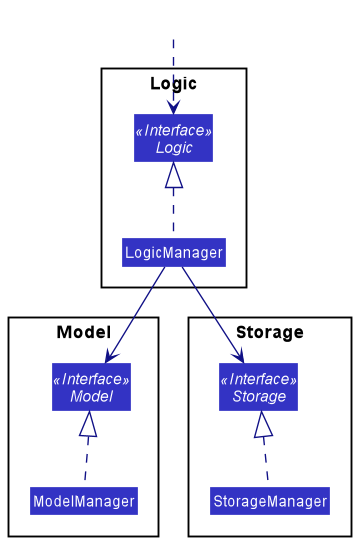
The sections below give more details of each component.
UI component
The API of this component is specified in Ui.java
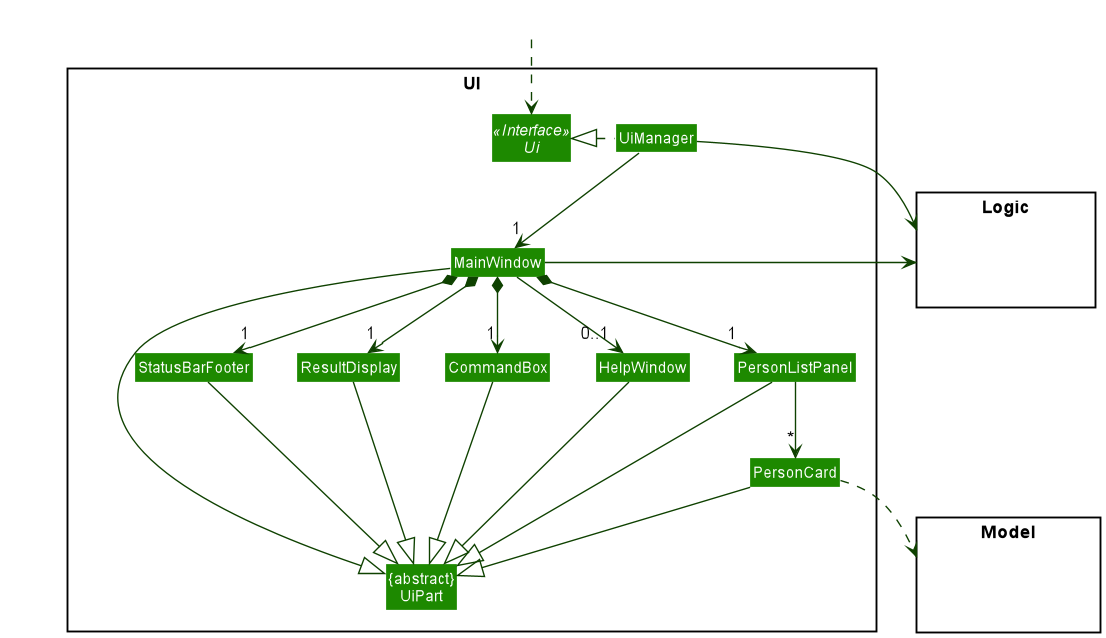
The UI consists of a MainWindow that is made up of parts e.g.CommandBox, ResultDisplay, PersonListPanel, StatusBarFooter etc. All these, including the MainWindow, inherit from the abstract UiPart class which captures the commonalities between classes that represent parts of the visible GUI.
The UI component uses the JavaFx UI framework. The layout of these UI parts are defined in matching .fxml files that are in the src/main/resources/view folder. For example, the layout of the MainWindow is specified in MainWindow.fxml
The UI component,
- executes user commands using the
Logiccomponent. - listens for changes to
Modeldata so that the UI can be updated with the modified data. - keeps a reference to the
Logiccomponent, because theUIrelies on theLogicto execute commands. - depends on some classes in the
Modelcomponent, as it displaysPersonobject residing in theModel.
Logic component
API : Logic.java
Here’s a (partial) class diagram of the Logic component:
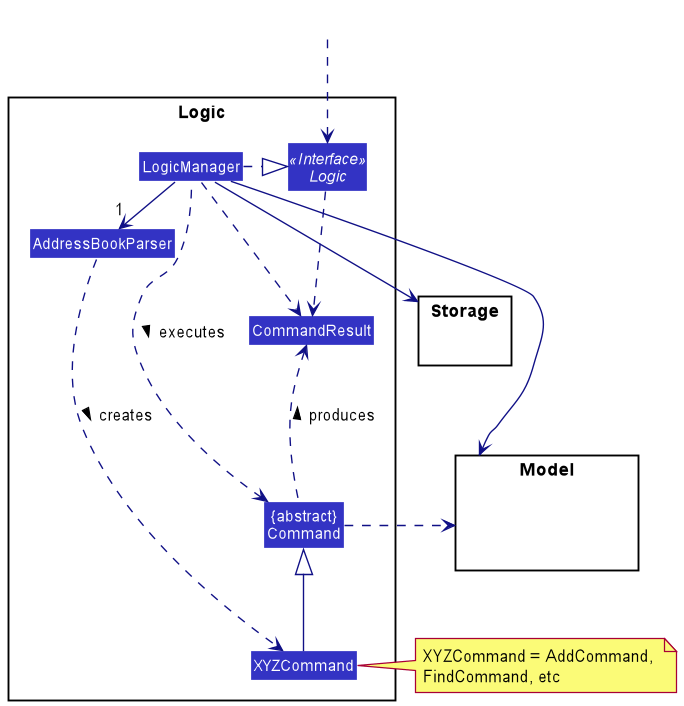
How the Logic component works:
- When
Logicis called upon to execute a command, it uses theAddressBookParserclass to parse the user command. - This results in a
Commandobject (more precisely, an object of one of its subclasses e.g.,AddCommand) which is executed by theLogicManager. - The command can communicate with the
Modelwhen it is executed (e.g. to add a person). - The result of the command execution is encapsulated as a
CommandResultobject which is returned back fromLogic.
The Sequence Diagram below illustrates the interactions within the Logic component for the execute("delete 1") API call.
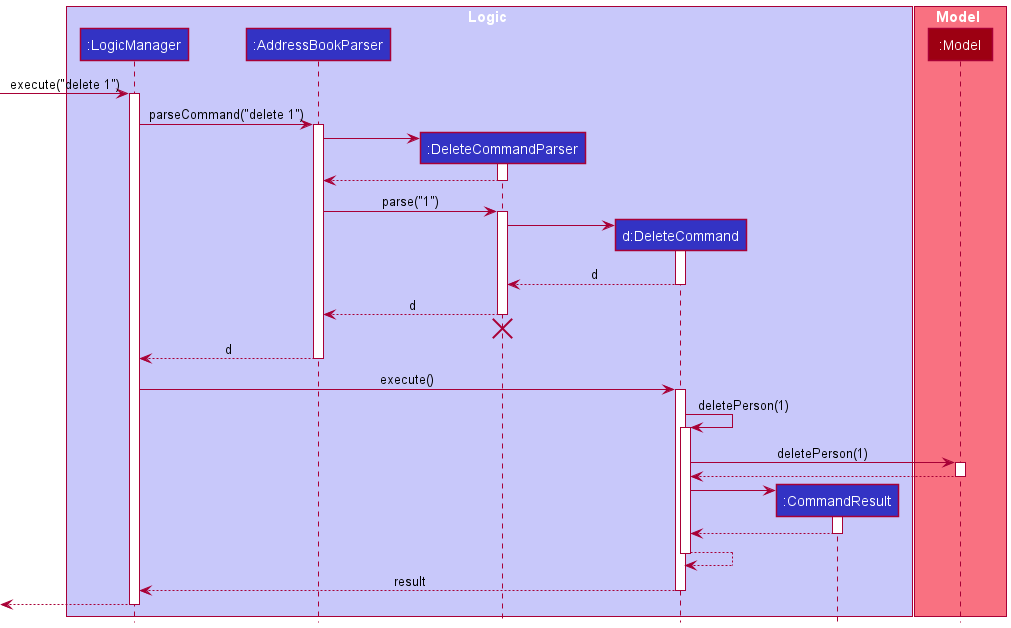
 Note: The lifeline for
 DeleteCommandParser should end at the destroy marker (X) but due to a limitation of PlantUML, the lifeline reaches the end of diagram.
Here are the other classes in Logic (omitted from the class diagram above) that are used for parsing a user command:
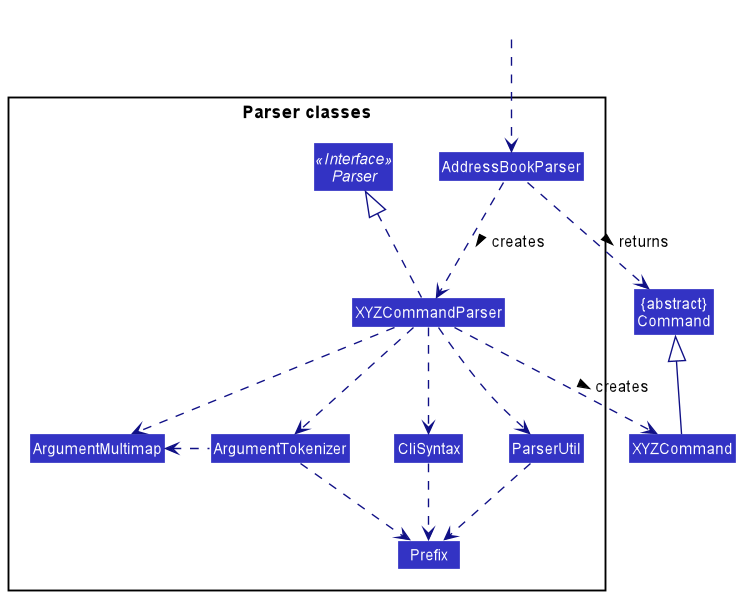
How the parsing works:
- When called upon to parse a user command, the
AddressBookParserclass creates anXYZCommandParser(XYZis a placeholder for the specific command name e.g.,AddCommandParser) which uses the other classes shown above to parse the user command and create aXYZCommandobject (e.g.,AddCommand) which theAddressBookParserreturns back as aCommandobject. - All
XYZCommandParserclasses (e.g.,AddCommandParser,DeleteCommandParser, …) inherit from theParserinterface so that they can be treated similarly where possible e.g, during testing.
Model component
API : Model.java
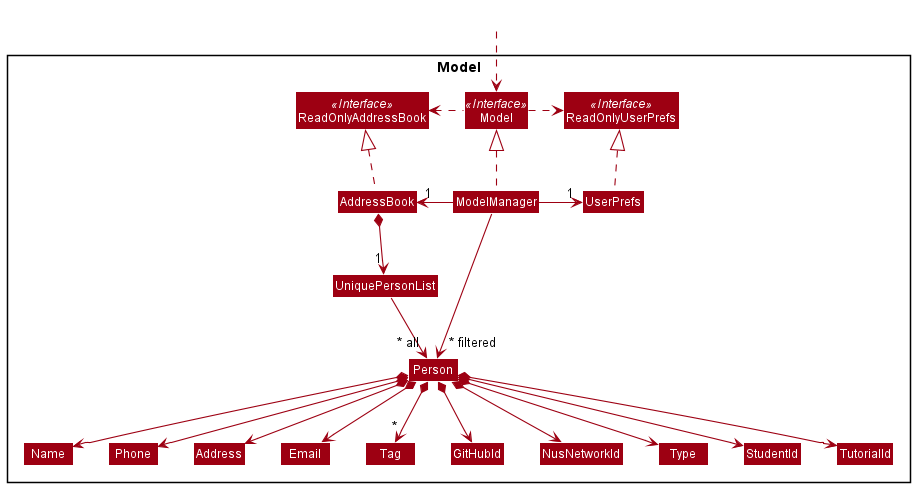
The Model component,
- stores the address book data i.e., all
Personobjects (which are contained in aUniquePersonListobject). - stores the currently ‘selected’
Personobjects (e.g., results of a search query) as a separate filtered list which is exposed to outsiders as an unmodifiableObservableList<Person>that can be ‘observed’ e.g. the UI can be bound to this list so that the UI automatically updates when the data in the list change. - stores a
UserPrefobject that represents the user’s preferences. This is exposed to the outside as aReadOnlyUserPrefobjects. - does not depend on any of the other three components (as the
Modelrepresents data entities of the domain, they should make sense on their own without depending on other components)
Note: An alternative (arguably, a more OOP) model is given below. It has a Tag list in the AddressBook, which Person references. This allows AddressBook to only require one Tag object per unique tag, instead of each Person needing their own Tag objects.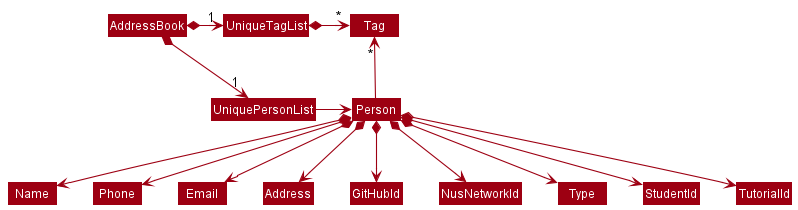
Storage component
API : Storage.java
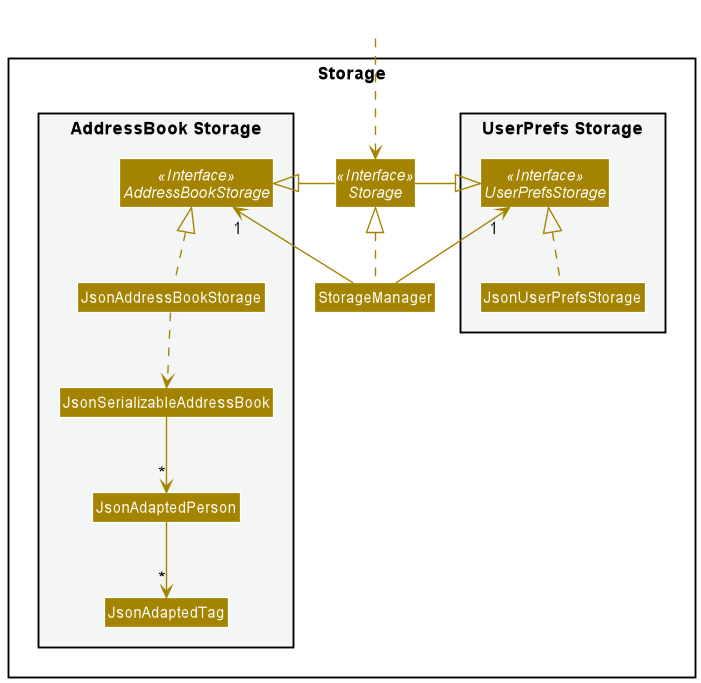
The Storage component,
- can save both address book data and user preference data in json format, and read them back into corresponding objects.
- inherits from both
AddressBookStorageandUserPrefStorage, which means it can be treated as either one (if only the functionality of only one is needed). - depends on some classes in the
Modelcomponent (because theStoragecomponent’s job is to save/retrieve objects that belong to theModel)
Common classes
Classes used by multiple components are in the seedu.addressbook.commons package.
Implementation
Data Archiving Features
Add feature
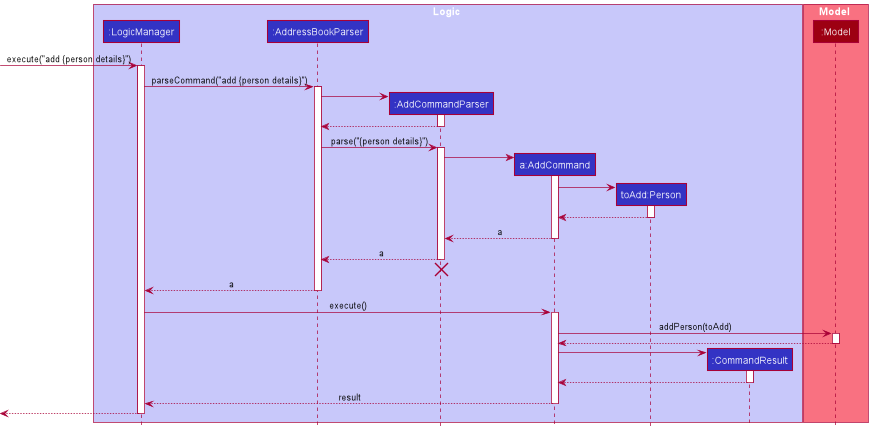
The add feature is facilitated by AddCommand. It extends Command with a person as parameter where the person to be added is stored internally as a toAdd. The add mechanism relies on ModelManager#addPerson() to add the Person to be added to the personList in ModelManager.
The following sequence diagram shows how the add operation works. For simplicity the command add n/John Doe p/98765432 a/311, Clementi Ave 2, #02-25 t/friends t/owesMoney g/john-doe N/e0123456 r/student s/A0123456X T/11 is simplified to add {person details}
Edit feature
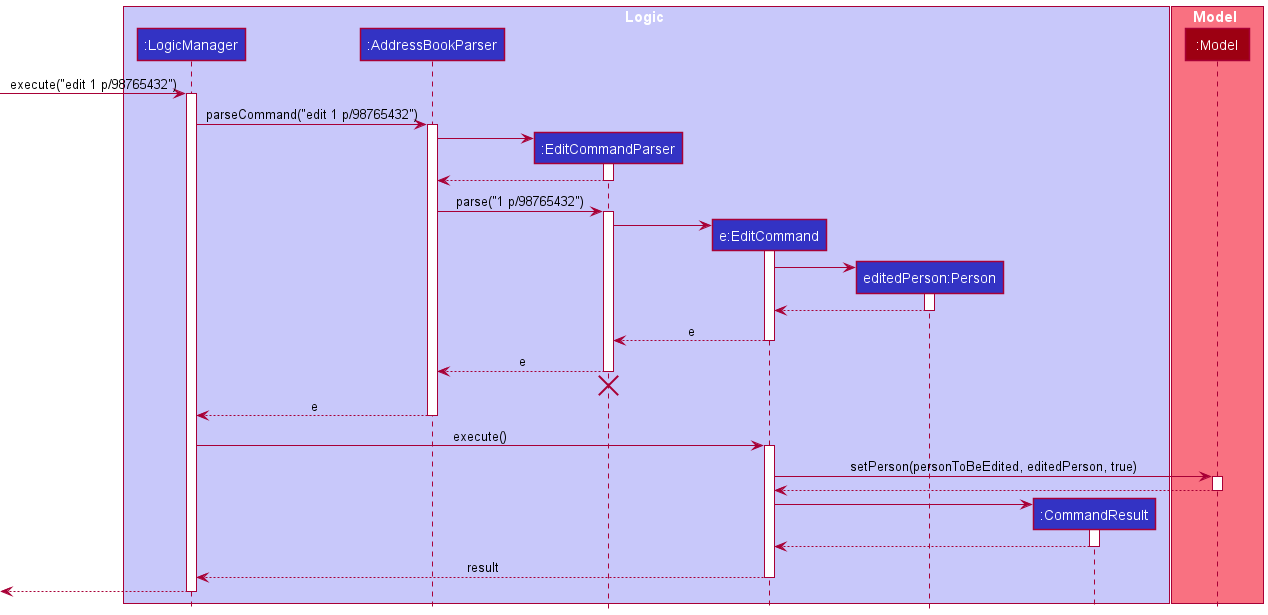
The edit feature is facilitated by EditCommand. It extends Command with an Index and EditPersonDescriptor as parameter where the person to be edited is stored at index in the personList and EditPersonDescriptor stored the details of the edited fields. The edit mechanism relies on ModelManager#setPerson() to edit the Person in the personList in ModelManager.
The following sequence diagram shows how the edit operation works.
Bulk Tag feature
The bulk tag feature is facilitated by BulkTagCommand. It extends Command with a Tag as a parameter. The addition of the Tag relies on ModelManager#setPerson() to edit the Person in the personList in ModelManager by specifically adding the given Tag to the person.
One important consideration for the command is that the bulk tag command does not affect the existing tags and thus functions differently as compared to the edit command.
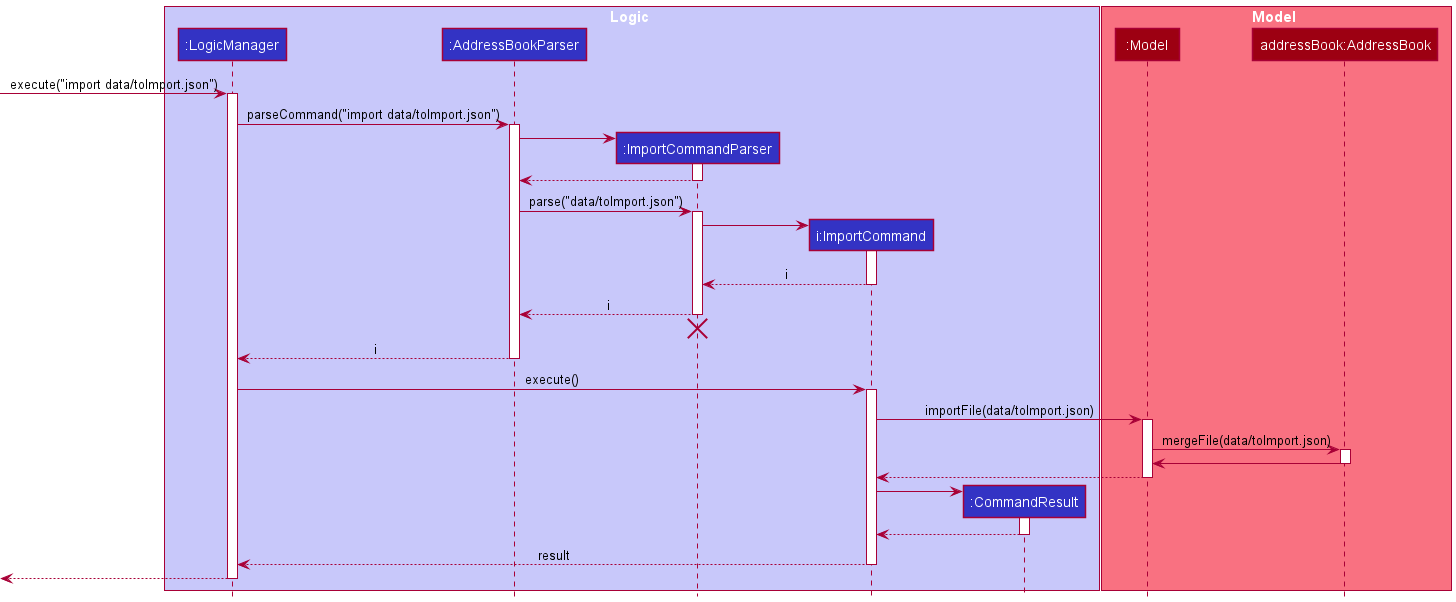
Import feature
The import feature is facilitated by ImportCommand. It extends Command with a file path where the targeted import file is stored, stored internally as a filePath. It also overwrites the execute function to import the json file from the file path stored.
This operation is exposed in the Model interface as Model#importFile(Path filePath). This is further facilitated by an additional function in AddressBook, AddressBook#mergeFile.
The following sequence diagram shows how the import operation works:
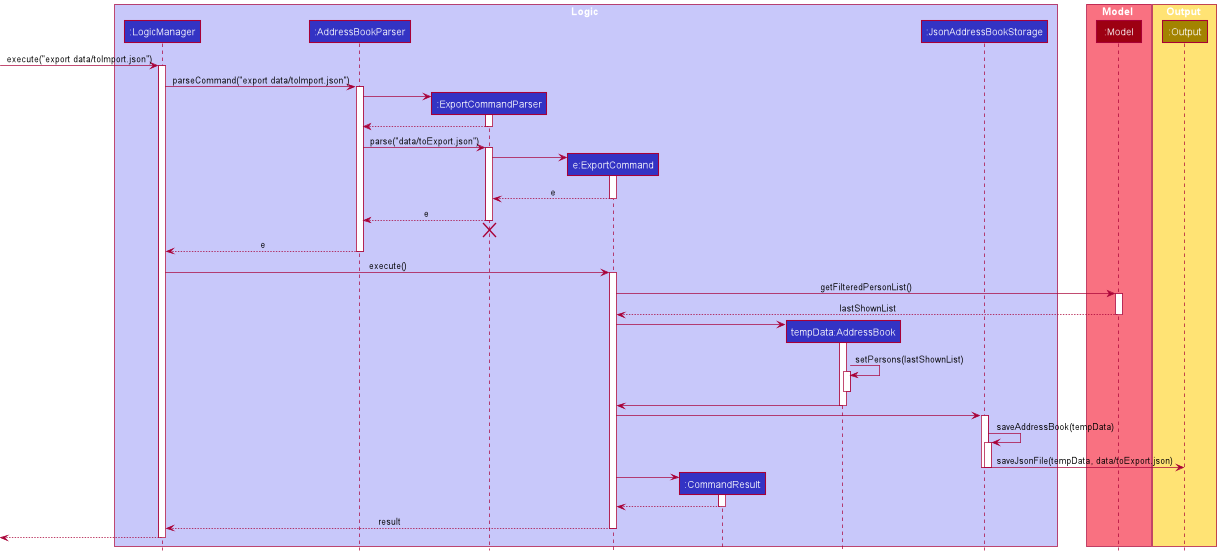
Export feature
The export feature is facilitated by ExportCommand. It extends Command with a filepath where the exported contact list should be stored, stored internally as a filePath. It also overwrites the execute function to export the last searched contact list to a json file in the file path stored.
The following sequence diagram shows how the export operation works:
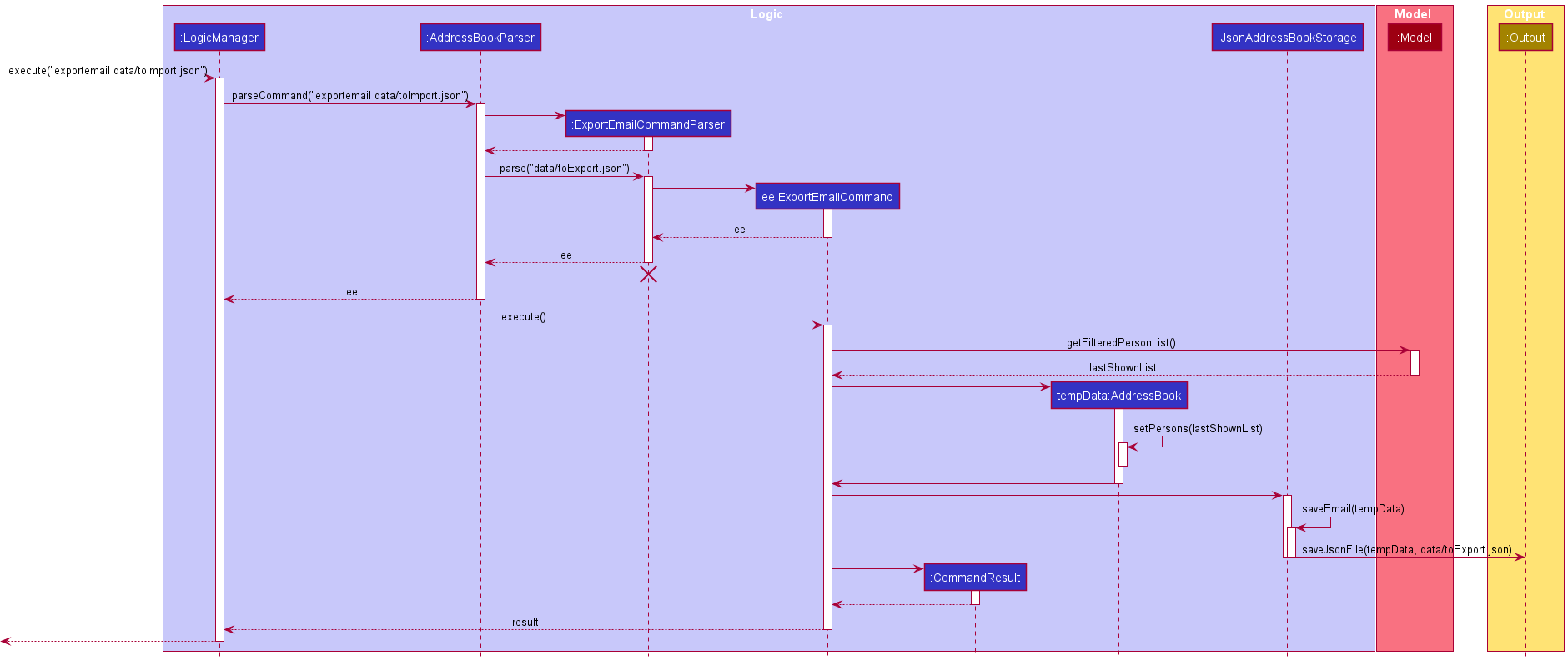
ExportEmail feature
The export feature is facilitated by ExportEmailCommand. It extends Command with a filepath where the exported contact list should be stored, stored internally as a filePath. It also overwrites the execute function to export the last searched contact list to a list of emails in the file path stored.
The following sequence diagram shows how the export operation works:
Address Book Management
Delete feature
The delete mechanism relies on ModelManager#deletePerson(). The Person(s) to be deleted is obtained through ModelManager#getFilteredPersonList()
Below is a sequence diagram for deleting a Person from the address book, executed after the user inputs delete 1
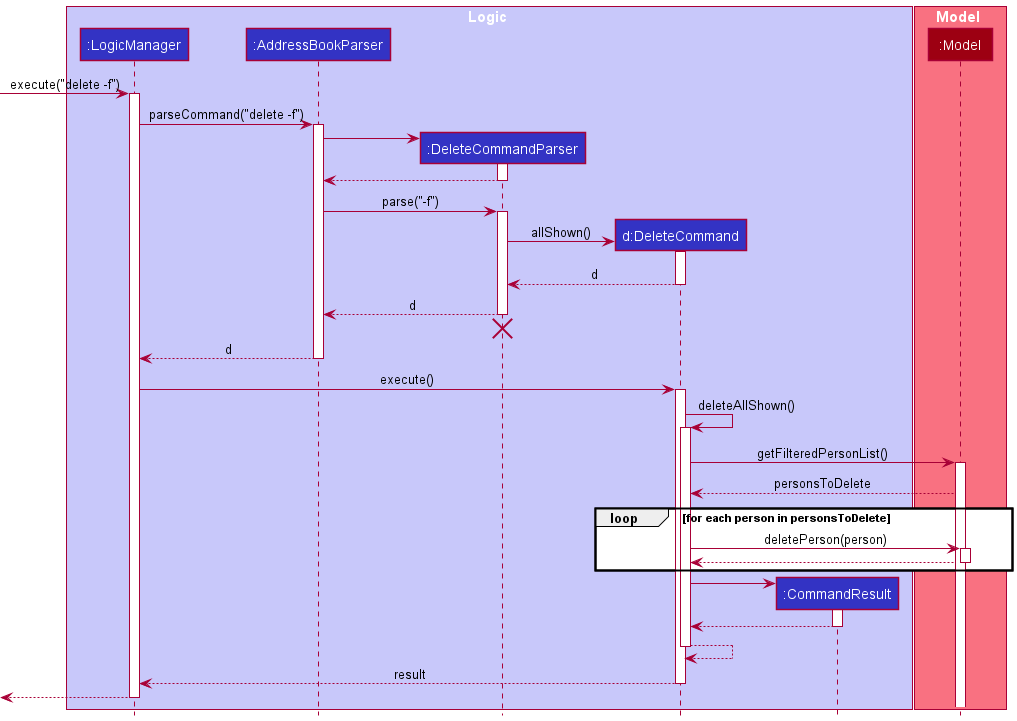
DeleteCommand also exposes 2 factory methods:
-
DeleteCommand#allShown()returns aDeleteCommandwhich deletes all Persons shown in the main window. -
DeleteCommand#all()which deletes all Persons in the address book.
Below is a sequence diagram for the deleting all shown Persons executed after the user inputs delete -f or delete -a -f. DeleteCommand iterates through the list returned by Model#getFilteredPersonList() to delete all Persons shown in the main window.
The DeleteCommand returned by DeleteCommand#all() uses AddressBook#resetData() exposed in the Model interface as Model#setAddressBook() to clear the address book by passing in an empty AddressBook.
Sort Feature
The sort feature is facilitated by SortCommand. It extends Command with a Prefix which specifies the prefix the AddressBook is to be sorted by, as well as a boolean reverse which specifies the order of the sorted list.
This method is exposed in the Model interface as Model#sortAddressBook() This is further facilitated by AddressBook, AddressBook#sortList(), a PersonComparator and a Person#compare(Person p, Prefix prefix) method to allow for sorting of the list by the Prefix specified.
Design Considerations
Aspect: How sort executes:
-
Alternative 1 (current choice): Sorts the list saved inside the
Model’sAddressBook.- Pros: Easy to implement.
- Cons: Users might just want a temporary sorting of the list and not a permanent sorting.
-
Alternative 2: Sorts the
filteredPersonslist shown by theModel.- Pros: Allow users to have a temporary sorting of the list, which they can later export if they want to be permanent.
- Cons: Difficult to implement, as the
FilteredListdata structure used byfilteredPersonscannot be mutated.
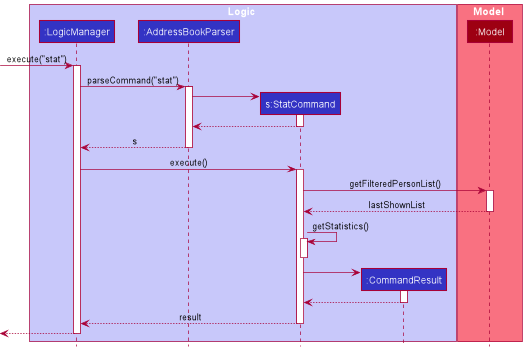
Statistic Feature
The statistic feature is facilitated by StatCommand. It overwrites the execute function to get a count of the various tags, types and tutorial ID of the last searched contact list.
The following sequence diagram shows how the statistic operation works:
Search features
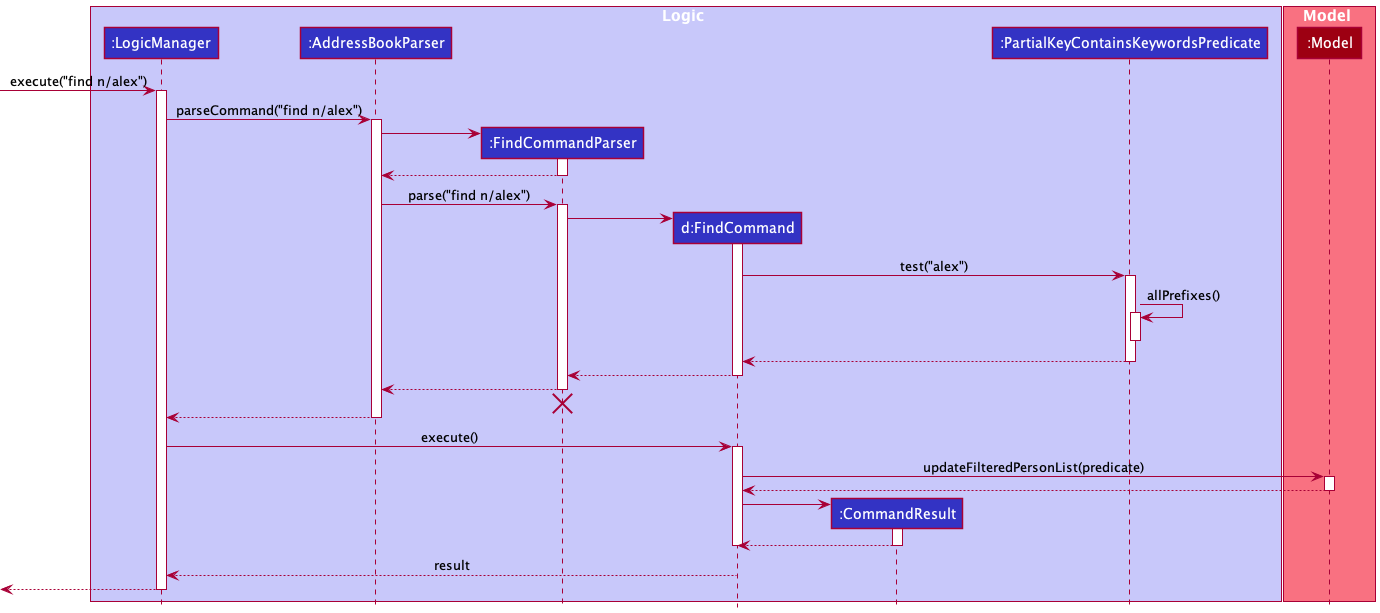
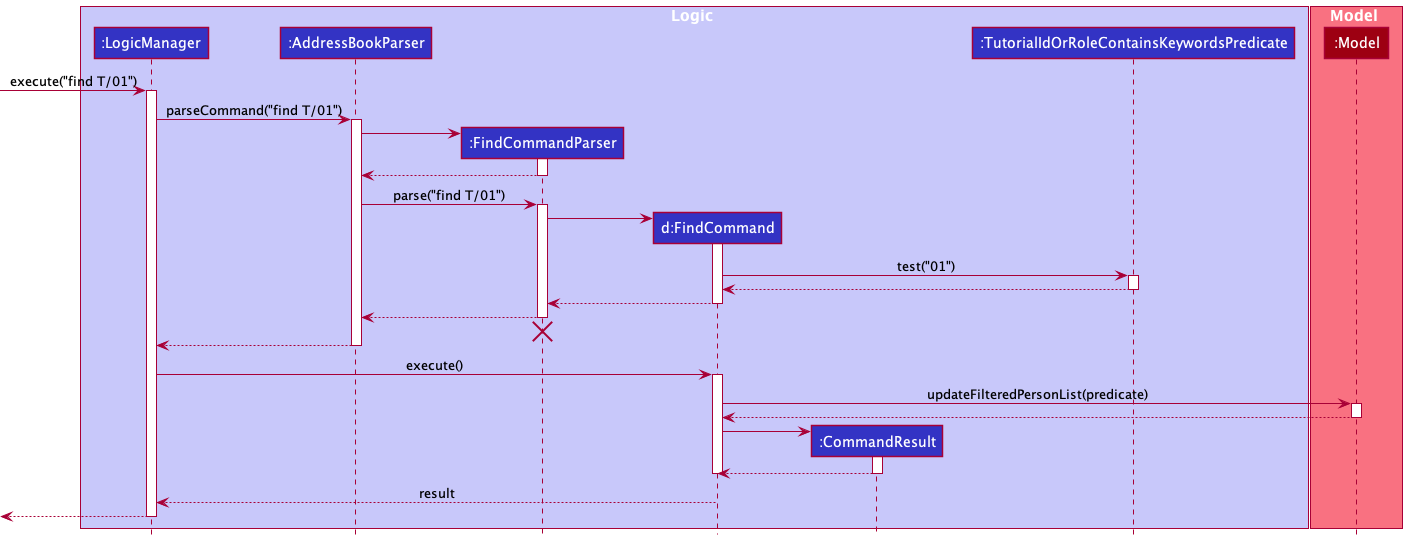
Find feature
The find feature is facilitated by FindCommand. It extends Command with a type to be searched, as well as the key to be searched. This feature uses AttributeContainsKeywordsPredicate#test(Person) and the person to be searched is obtained using ModelManager#getFilteredPersonList(). If a search using a partial match can be done, the feature also uses AttributeContainsKeywordsPredicate#testByType(Person, String).
The following sequence diagram shows how the find operation works for a name:
The following sequence diagram shows how the find operation works for a Tutorial ID:
Undo and Redo Features
The undo/redo mechanism is facilitated by OperationManager, which stores 2 stacks of Operation, one for redo (redoStack) and one for undo (undoStack).
Each Operation stores a ModelManagerState which encapsulates the state of ModelManager by storing AddressBook, UserPrefs, and Predicate<Person>.
OperationManager exposes the following methods:
-
OperationManager#run()— Saves the current model manager state to history then runs an operation. -
OperationManager#undo()— Restores the previous model manager state from its history. -
OperationManager#redo()— Redoes the last undone operation.
The following sequence diagram shows how the undo operation works:
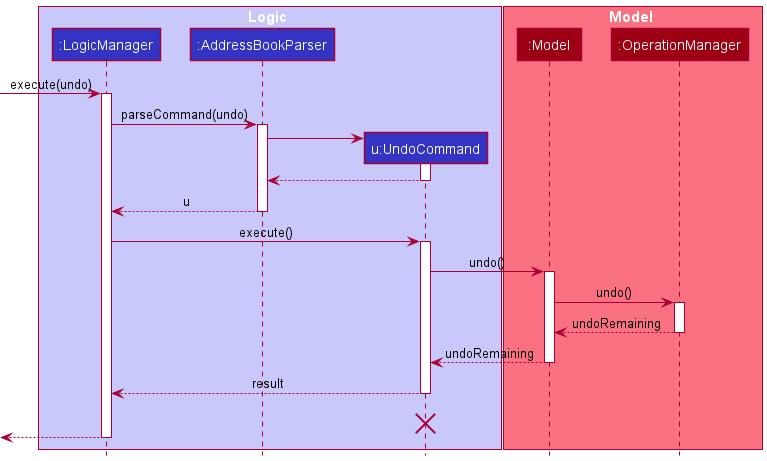
Note: The lifeline for UndoCommand should end at the destroy marker (X) but due to a limitation of PlantUML, the lifeline reaches the end of diagram.
OperationManager#undo() pops an Operation from undoStack, then pushes it to the redoStack.
OperationManager#redo() pops an Operation from redoStack, then pushes it to the undoStack.
OperationManager#run() clears redoStack as any remaining redoes are invalidated by the last run command.
Documentation, logging, testing, configuration, dev-ops
Appendix: Requirements
Product scope
Target user profile:
- instructor from cs2103
- has a need to manage a significant number of contacts of students and tutors
- prefer desktop apps over other types
- can type fast
- prefers typing to mouse interactions
- is reasonably comfortable using CLI apps
Value proposition: manage contacts faster than a typical mouse/GUI driven app
User stories
Priorities: High (must have) - * * *, Medium (nice to have) - * *, Low (unlikely to have) - *
| Priority | As a … | I want to … | So that I can… |
|---|---|---|---|
* * * |
potential user | find a user guide for the app | have an idea of the features provided by the app |
* * * |
beginner user | add a new person | keep track of all my students and TAs |
* * * |
beginner user | edit a person | change any incorrect data and remove specific tags when needed |
* * * |
Professor | tag contacts | keep track of Lecture/Tutorial groups that different contacts belong to |
* * * |
beginner user | see all the contacts I have at once | easily tell who I have added and who I have not |
* * * |
impatient user | import my existing contacts from a json file | start using ProfBook without manually inputting every piece of information |
* * * |
cautious user | export my existing contacts to a json file | move my address book or keep a backup |
* * * |
beginner user | save the data to a json document | update it manually and have the option to close the program and open it again later |
* * * |
organised user | delete a specific contact with a specific detail | remove entries that I no longer need |
* * * |
beginner user | exit the program when I am done | I don’t have to keep it running all the time |
* * * |
intermediate user | search a person with any specific detail | locate details of persons without having to go through the entire list |
* * * |
intermediate user | search a person with any specific partial detail | locate details of persons even if I do not remember their full details |
* * * |
intermediate user | search a person with the given tag | view all the contacts with the given tag |
* * |
beginner user | find the user guide for the app on the app | have an idea of the features of the app without having to leave the app |
* * |
beginner user | export search the set of contacts with the given tag | locate a person easily |
* * |
user in a supervising position | export email to a file | send specific emails to a select few contacts |
* * |
curious user | view statistics about the contacts that I have added | derive more information about my contacts |
* * |
Professor | bulk tag contacts | I can quickly tag TAs and Students according to their groups |
Use cases
(For all use cases below, the System is the ProfBook and the Actor is the user, unless specified otherwise)
Use case: Add a person
MSS
- User requests to add a person
- ProfBook checks if input is valid
-
ProfBook adds the persons
Use case ends.
Extensions
- 2a. Arguments that should be there is not there
-
2a1. ProfBook rejects the command and shows an error message.
Use case ends.
-
- 2b. Arguments that are added results in a person that already exists in the ProfBook.
-
2b1. ProfBook rejects the command and shows an error message.
Use case ends.
-
Use case: Edit a contact
MSS
- User requests to list/search persons
- ProfBook shows a list of persons
- User requests to edit a specific person in the list
-
ProfBook edits the person
Use case ends.
Extensions
-
2a. The list is empty.
Use case ends.
- 3a. The given index is invalid.
- 3a1. ProfBook rejects the command and shows an error message.
Use case resumes at step 2.
- 3b. The attribute to be edited does not exist.
- 3b1. ProfBook rejects the command and shows an error message.
Use case ends.
- 3c. If the attribute edited is the name and results in a similar person i.e. same name as another person
- 3c1. ProfBook rejects the command and shows an error message.
Use case ends.
Use case: Check statistics of current contact list
MSS
- User requests to get statistics of persons
- ProfBook checks if the input is valid.
- ProfBook shows the list of statistics for the current list. Use case ends
Extensions
-
2a. The list is empty.
- 2a1. ProfBook rejects the command and shows an error message.
Use case ends.
Use case: Find a contact
MSS
- User requests to search persons
- ProfBook checks if the input is valid.
-
ProfBook shows the list of persons that match the searched key and attribute.
Use case ends.
Extensions
-
2a. The given attribute type is invalid.
- 2a1. ProfBook rejects the command and shows an error message.
Use case ends.
-
2b. The command format is invalid.
- 2b1. ProfBook rejects the command and shows an error message.
Use case ends
Use case: Delete a person
MSS
- User requests to list/search persons
- ProfBook shows a list of persons
- User requests to delete a specific person in the list
-
ProfBook deletes the person
Use case ends.
Extensions
-
2a. The list is empty.
Use case ends.
-
3a. The given index is invalid.
-
3a1. ProfBook rejects the command and shows an error message.
Use case resumes at step 2.
-
Use case: Bulk Tag a person
MSS
- User requests to bulk tag the filtered person list
- ProfBook checks if input is valid
-
ProfBook adds the tag to all the persons in the filtered person list
Use case ends.
Extensions
- 2a. Tag to be added is invalid
-
2a1. ProfBook rejects the command and shows an error message.
Use case ends.
-
- 2b. The filtered list is empty
-
2b1. ProfBook runs the command but it has no effect.
Use case ends.
-
Use case: Sort contacts
MSS
- User requests to sort contacts
- ProfBook checks if input is valid
-
ProfBook sorts the contacts
Use case ends.
Extensions
- 2a. Invalid arguments given
- 2a1. ProfBook rejects the command and shows an error message.
Use case ends
Use case: Import existing contacts
MSS
- User requests to import contacts from JSON file.
- ProfBook checks if file is valid format
-
ProfBook merges the existing contacts with contacts from JSON file
Use case ends.
Extensions
- 2a. The file is in invalid format/does not exist
- 2a1. ProfBook rejects the command and shows an error message.
Use case ends.
Use case: Export contacts MSS
- User requests to list/search persons
- ProfBook shows a list of persons
- User requests to export the list
-
ProfBook exports list to JSON file
Use case ends.
Extensions
-
3a. The file directory is invalid
- 3a1. ProfBook rejects the command and shows an error message. Use case resumes at step 2.
-
3b. The filtered list is empty
- 3b1. ProfBook rejects the command and shows an error message. Use case resumes at step 2.
Use case: Export emails of contacts
MSS
- User requests to list/search persons
- ProfBook shows a list of persons
- User requests to export the emails of the list
-
ProfBook exports list of emails to JSON file
Use case ends.
Extensions
-
3a. The file directory is invalid
-
3a1. ProfBook rejects the command and shows an error message.
Use case resumes at step 2.
-
Use case: Undo last command
MSS
- User requests to undo the last command
- ProfBook checks if there are commands to undo
-
ProfBook reverses the last command
Use case ends.
Extensions
- 2a. There are no commands to undo
-
2a1. ProfBook shows a message.
Use case ends.
-
Use case: Redo last command
MSS
- User requests to redo a command
- ProfBook checks if there are commands to redo
-
ProfBook reverses the last undone command
Use case ends.
Extensions
- 2a. There are no commands to redo
-
2a1. ProfBook shows a message.
Use case ends.
-
Non-Functional Requirements
- Should work on any mainstream OS as long as it has Java
11or above installed. - Should be able to hold up to 1000 persons without a noticeable sluggishness in performance for typical usage.
- A user with above average typing speed for regular English text (i.e. not code, not system admin commands) should be able to accomplish most of the tasks faster using commands than using the mouse.
- The system should be usable by a novice who has never used any similar application.
- The project is expected to adhere to a schedule that delivers a new version every 2 weeks.
Glossary
- Mainstream OS: Windows, Linux, Unix, OS-X
- Private contact detail: A contact detail that is not meant to be shared with others
- Person: A single contact in the address book. An individual can be represented by multiple Persons if they are added multiple times.
- Tag: A text string associated with a person. A person can have multiple tags, and a tag can be added to multiple persons.
Appendix: Instructions for manual testing
Given below are instructions to test the app manually.
Note: These instructions only provide a starting point for testers to work on;
testers are expected to do more exploratory testing.
Launch and shutdown
-
Initial launch
-
Download the jar file and copy into an empty folder
-
Double-click the jar file Expected: Shows the GUI with a set of sample contacts. The window size may not be optimum.
-
-
Saving window preferences
-
Resize the window to an optimum size. Move the window to a different location. Close the window.
-
Re-launch the app by double-clicking the jar file.
Expected: The most recent window size and location is retained.
-
Add Test
-
Adding a person to the ProfBook
-
Test case:
add n/John Doe p/98765432 a/311, Clementi Ave 2, #02-25 t/friends t/owesMoney g/john-doe N/e0123456 r/student s/A0123456X T/11
Expected: Adds the person to the ProfBook.
Now progressively remove or edit each attribute in the add command and view the outputs-
Test case: Calling the same command
add n/John Doe p/98765432 a/311, Clementi Ave 2, #02-25 t/friends t/owesMoney g/john-doe N/e0123456 r/student s/A0123456X T/11
Expected: This person already exists in the address book. -
Test case: On changing name to lower case we can add the person
add n/john doe p/98765432 a/311, Clementi Ave 2, #02-25 t/friends t/owesMoney g/john-doe N/e0123456 r/student s/A0123456X T/11
Expected: Adds the person to the ProfBook. -
Test case:
add n/John Doe a/311, Clementi Ave 2, #02-25 t/friends t/owesMoney g/john-doe N/e0123456 r/student s/A0123456X T/11
Expected: Invalid command format!
-
-
Statistics Test
-
Showing statistics of all persons are being shown
-
Prerequisites: List all persons using the
listcommand. Multiple persons in the list. -
Test case:
stat
Expected: Tag, Type and Tutorial count of all the contacts are shown in the display
-
-
Showing statistics of last searched list of contacts
-
Prerequisites: Search a group of contacts using the find command such as
find t/friendscommand. Multiple persons in the list. -
Test case:
stat
Expected: Tag, Type and Tutorial count of the last searched list of contacts are shown in the display
-
Edit Test
- Editing a person in the ProfBook
-
Test case:
edit 1 n/John Doe
Expected: Edits the person at index 1 and changes name to John Doe. -
Test case: On changing index to 2 and running the command
edit 2 n/John Doe
Expected: This person already exists in the address book.
Now progressively replace or add more attribute in the edit command and view the outputs -
Test case:
edit 1 N/e0000000
Expected: Edits the person at index 1 and changes NUSNET_ID to E0000000 and Email to e0000000@u.nus.edu.
-
Find test
-
Finding a person
-
Prerequisites: Multiple persons in the list.
-
Test case:
find n/alex
Expected: List shows contacts with name matching or partially matching ‘alex’. -
Test case:
find n/ alex
Expected: Invalid command format! -
Test case:
find n/
Expected: Invalid command format! -
Test case:
find l/
Expected: Invalid command format! -
Other incorrect find commands to try:
find,find a,...(where attribute type does not exist)
Expected: Similar to previous.
-
Delete test
-
Deleting a person while all persons are being shown
-
Prerequisites: List all persons using the
listcommand. Multiple persons in the list. -
Test case:
delete 1
Expected: First contact is deleted from the list. Details of the deleted contact shown in the status message. Timestamp in the status bar is updated. -
Test case:
delete 0
Expected: No person is deleted. Error details shown in the status message. Status bar remains the same. -
Other incorrect delete commands to try:
delete,delete x,...(where x is larger than the list size)
Expected: Similar to previous.
-
Bulk Tag Test
-
Tagging the last searched list of contacts
-
Test case:
bulk_tag t/friends
Expected: Added the Tags [friends] to the Persons -
Test case:
bulk_tag t/friends
Expected: Added the Tags [friends] to the Persons. No change since all persons have the tagfriends -
Test case:
bulk_tag t/friends t/passed
Expected: Added the Tags [passed] [friends] to the Persons. Now tagpassedis added to all the person andfriendsalready existed for all the persons
-
Sort Test
- Sorting contacts in ProfBook
-
Test case:
sort
Expected: List is sorted by name. -
Test case:
sort -r
Expected: List is sorted by name in reverse. -
Test case:
sort T/
Expected: List is sorted by TutorialID -
Test case:
sort a/
Expected: No change to list. Error details shown in status message.
-
Import and Export
-
Exporting then importing back original list of contacts
-
Prerequisites: List all persons using the
listcommand. Multiple persons in the list. -
Test case:
export currList.json
Expected: The current contact list is exported to the file currList.json-
Test case:
edit 0 n/Amanda
Expected: First contact name is updated to Amanda -
Test case:
import currList.json
Expected: The previous unedited old contact will be added into the current contact list
-
-
Other incorrect delete commands to try:
import,export
Expected: Error details shown in the status message.
-
-
Exporting the last searched list of contacts
-
Prerequisites: Search a group of contacts using the find command such as
find t/friendscommand. Multiple persons in the list. -
Test case:
export friends.json
Expected: Last searched contacts are exported to json file, friends.json
-
Export Emails Test
-
Exporting the emails of all persons shown
-
Prerequisites: List all persons using the
listcommand. Multiple persons in the list. -
Test case:
exportemail emails.txt
Expected: Emails of all contacts are exported to emails.txt -
Other incorrect delete commands to try:
exportemail
Expected: Error details shown in the status message.
-
-
Exporting emails of last searched list of contacts
-
Prerequisites: Search a group of contacts using the find command such as
find t/friendscommand. Multiple persons in the list. -
Test case:
exportemail friends.txt
Expected: Emails of last searched contacts are exported to emails.txt
-
Undo and Redo Test
- Undoing the most recent command
- Test case:
undoafter program start up Expected: Error detail shown for having no commands to undo - Test case:
delete -afollowed byundoExpected:delete -adeletes all contacts.undobrings back all deleted contacts.
- Test case:
- Redoing a successful
undocommand run immediately before- Test case:
redo- Expected: The effect of the
undocommand is reversed
- Expected: The effect of the
- Test case:
- Redoing a most recent command with no
undocommand immediately before- Test case:
redo- Expected: Error detail shown for having no commands to redo
- Test case:
Loading/Saving data
- Dealing with missing/corrupted data files
-
Remove a
{from data/profBook.jsonExpected: ProfBook will be empty on load.
-
Test case:
exitExpected: profBook.json will be overwritten and no longer corrupted.
-
-
Delete data/profBook.json
Expected: ProfBook will be populated with dummy data on load.
-
Test case:
exitExpected: profBook.json will be recreated in the data directory
-
-
Effort
The difficulty level for our project is at a relatively moderate level. Instead of making large changes to AB3, we opted to enhance existing features and introduce new features which complement the existing functionalities.
The challenges we faced were largely from figuring out the original implementation of AB3 so that we can introduce features by extending the structure of AB3 instead of overhauling.
For example, when implementing the sort feature, there were many different list representations of the contacts used throughout the application, some of which were immutable. It required time and effort to walk through the code, and sufficiently test modifications to ensure that the sort feature modifies the correct mutable list, and that there were no unintended side effects from directly manipulating the list.
Another feature which required much effort was the undo and redo commands. In order to implement them with minimal changes to existing code, we had to investigate how all data changes are propagated following the execution of their calling command. Then, we had to write an implementation which allowed us to decouple any new classes required from those that already existed. In the end, we settled on using functional interfaces and Java lambdas to offer an intuitive syntax and to follow software engineering principles. The only required changes to old code were to wrap existing methods in ModelManager in a lambda function which is passed to a new OperationManager class as Runnable, from which OperationManager handles all states changes, transparent to other developers.
In comparison to AB3, ProfBook was a harder project due to the large amounts of information attached to each contact.
Managing all that information and making sure that each of our features work with the information in an intuitive way was one of the bigger achievements of ProfBook.
Another big achievement of the project was how we integrated import and export features to ProfBook so that the information in ProfBook is portable and can be transferred between users easily. Since the output/input file is a JSON file, it can be used in conjunction with other apps as well.